Qonic Agentic 4D has won the 2026 buildingSMART International openBIM Award in the Technology category, marking Qonic’s second buildingSMART award. For us, this award is about more than a second trophy. It recognises that construction planning can start from open data and stay useful long after the tender. And it confirms that we are solving a real problem in AECO, at the point where the plan in the office and the work on site keep drifting apart.
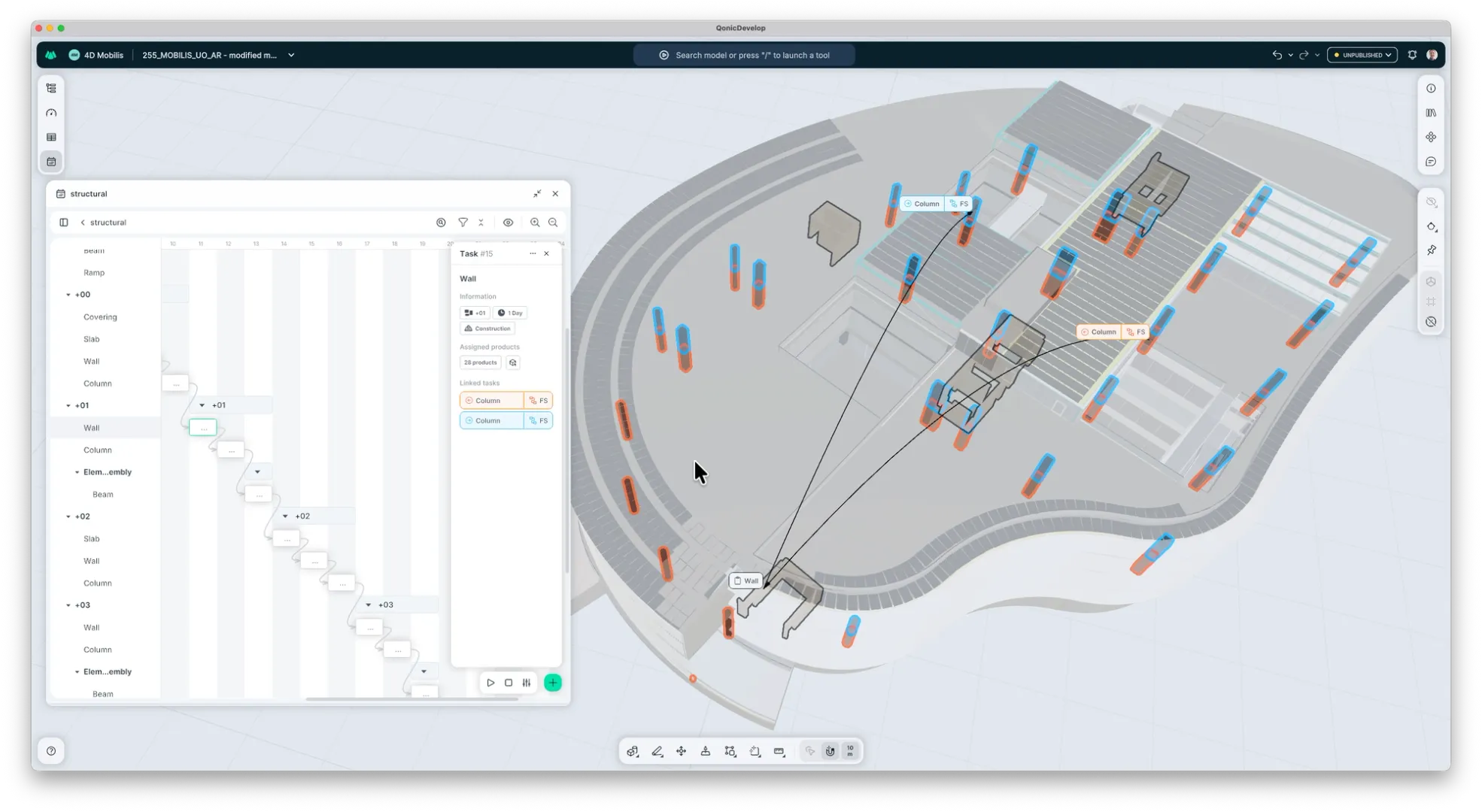
Qonic Agentic 4D generates a construction schedule from the structure, geometry and data in an IFC model. The result is a real schedule, with tasks linked to building elements, a Gantt chart and a 4D sequence that the planning engineer can check and refine.
This is how the jury explained its decision:
"Qonic convinced the jury with a clear problem statement addressing a missing workflow that openBIM can enable, supported by a solution demonstrating how IFC can be used for a new approach to scheduling simulation (4D). It uses the richness of IFC data to automate the process and address several shortcomings in the original data set. It represents a solution that can enhance openBIM workflows in practice right away."
- buildingSMART International openBIM Awards jury, 2026
In the award demonstration, a structural model with 2,535 elements became a model-linked construction schedule in 20 seconds. It all runs in Qonic, the browser-based BIM platform built around open IFC, with no hardware required.
Why construction planning loses touch with the site
Dieter Froyen, Industry Lead for Construction at Qonic, knows the usual master schedule from his own projects: several A0 sheets full of codes that hardly anyone on site could read, so hardly anyone looked at them. The planning engineer depended on whatever information reached him and had little contact with the work itself.
Meanwhile, the site ran its own two-week plan on a whiteboard. Deliveries were arranged by email and phone, and crane planning lived somewhere else. A delayed element or a late client decision changed the sequence straight away, but by the time the official schedule caught up, the site was often working to a different plan.
That is the missing workflow the jury refers to: a plan that stays connected to the model and to the people building from it.
How is Agentic 4D different from conventional 4D BIM?
Most construction schedules are a giant Gantt chart with no link to the building model. The planner knows which bar means which wall; few others do. Even when teams invest in 4D, they start from a finished model and a finished schedule and spend a lot of time linking the two, which is why 4D so often stops at the tender animation.
Agentic 4D starts with the IFC model alone. Qonic generates the first schedule and the links between tasks and elements in one step, so the planner begins by reviewing a plan instead of building one from scratch. If a schedule already exists, it can still be imported.
What does Qonic read from the IFC model?
A planner doesn't need to know the IFC schema to use Agentic 4D. Qonic reads three things about every element: where it is (the building, storey and zone it sits in), what it is (its IFC class, classification and properties) and what it is connected to (its relationships with other elements).
Qonic combines those model facts with the construction knowledge of the planning engineer, who decides how the work should be grouped and in what order it should happen. IFC can also store the schedule itself, through entities such as IfcTask and IfcWorkSchedule, which is why the 4D data can travel with the model.
How does Agentic 4D work?
The Agentic 4D engine performs two core actions: it generates an initial plan from IFC data and helps the planner refine it.
1. Prepare the model for construction
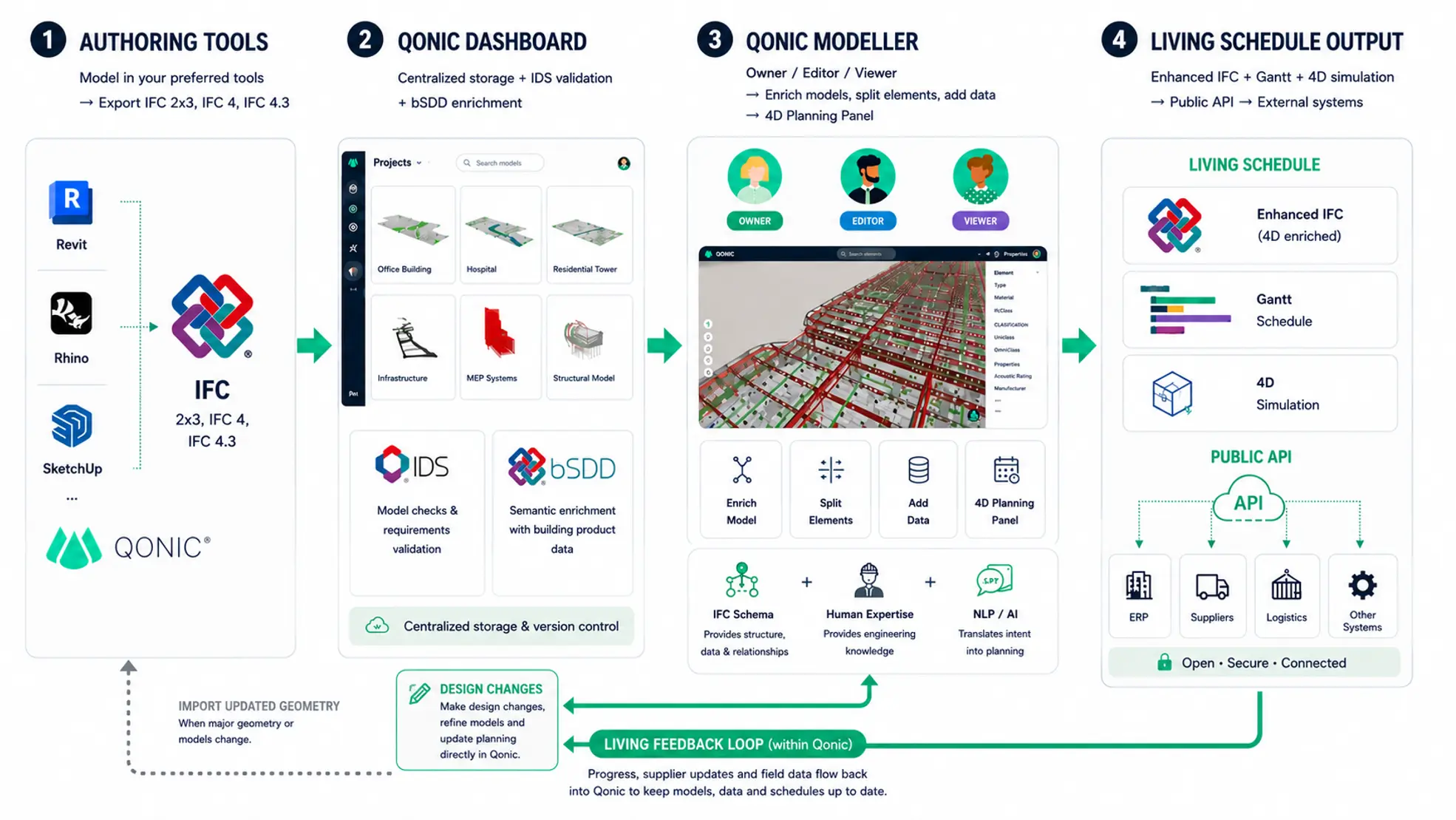
The workflow starts with an IFC model from an authoring tool such as Revit, Rhino, SketchUp or Archicad, or with a model developed from scratch inside Qonic.
The model does not have to be perfect, and it rarely is. A design model is seldom organised the way a contractor will build it, which is exactly the "shortcomings in the original data set" the jury pointed to. A wall may need to be split by storey. A concrete structure may need to be divided into pour phases. Finishes, insulation, formwork or other construction scope may need to be added before quantities and planning become reliable.
Instead of reporting every problem to the original modeller and waiting for another export, the project team can prepare the model for its construction use inside Qonic. In Qonic, the project team can check classifications, correct inconsistent data, add missing information and split elements by storey, zone, work package or pour phase, without sending every issue back to the original modeller. Start from an IFC model from any authoring tool, or from a model built in Qonic. The same preparation also serves quantities, coordination and reporting.
2. Generate the first construction plan
A planning preset decides how elements are grouped: by building, storey, zone, element class or construction type. The planner sets the initial task order, and Qonic creates the tasks and links them to the elements.
The schedule appears in a time-based planning view and in the 3D model at the same time. Select a task and you see its physical scope. Select an element and you see where it sits in the sequence.
3. Review the sequence and test alternatives
The first schedule is a starting point. The planning professional still decides how the project should be built. Because activities are linked to model elements, the proposed construction logic can be examined visually:
- Can the elements be installed in this order?
- Does an activity depend on work planned for a later phase?
- Is part of the construction scope missing?
- Should the project be divided into different work zones?
- Could another sequence, crew setup or construction method reduce time and risk?
The planner can modify the schedule in the Planning Panel or use natural-language instructions. For example:
- Create one task per level for all walls containing thermal insulation.
- Add separate tasks for the covering layers in the wall assemblies on each floor.
- Divide the building into three construction phases and update the sequence.
The agent finds the relevant elements in the model and carries out the action inside Qonic. It does not invent a construction method. It applies the planner's decision to the right elements, faster than doing it by hand, and the planner checks the result in the planning view and the model.
4. Check the sequence and compare variants
Because every activity is linked to model elements, the construction logic can be checked visually: whether elements can be installed in this order, whether an activity depends on work planned later, whether scope is missing, and whether different zones, crews or methods would reduce time and risk.
Variants are quick to make. In the award demonstration, a project with two buildings was split into three phases, and a new planning variant was ready in five minutes and four seconds. The level of detail follows the model: planning by storey or zone on an early design model, down to beams, plates, bolts or lift components on a fabrication model.
This enables teams to study not only the main construction phases but also how components should be produced, delivered and assembled. The available detail always depends on the information present in the model.
Agentic 4D makes alternatives faster to create and easier to assess. The planner remains responsible for constructability, sequencing, resources and risk.
5. Share a plan the project team can understand
A schedule has limited value if only the planning engineer can interpret it. Project managers, work preparers, BIM coordinators and site teams can review the same plan and see exactly which part of the building each activity refers to. Qonic runs in the browser, on mobile and as a desktop app, with role-based access: some people inspect the plan, authorised users adjust it.
When a delivery slips or a crew moves faster than expected, the team opens the same model-linked plan, sees which physical scope is affected and adjusts the sequence. When a new version of the model arrives, corrections made in Qonic are kept and only genuine conflicts are flagged for review. The model provides a shared visual language for discussing the sequence before construction begins.
A working schedule, not just a 4D animation
Qonic generates a model-linked construction schedule that drives the visual 4D sequence. Teams do not need an existing Primavera or Microsoft Project schedule to get started: the first planning structure can be generated directly from the IFC model. The plan contains a task hierarchy, start dates, durations, dependencies, dependency types and lags. It also records which building elements belong to each task. This planning data drives the Gantt chart and visual 4D simulation inside Qonic.
Qonic's data structure is aligned with IFC. Plans from Microsoft Project (.xml, .mpp, .mpx) and Primavera P6 (.xer) can be imported, and finished plans export back to both as XML. When the model is exported to IFC, the 4D data goes with it: tasks and hierarchy, dates, durations, dependencies, lags and the links between tasks and elements.
Construction projects outlive applications, subscriptions and project teams. With open IFC, the project team keeps control of its information from planning to handover. This makes 4D useful beyond tenders and client presentations. The same plan can support constructability reviews, phasing decisions and construction follow-up when circumstances change on site.
The longer-term direction is to connect it with supplier, logistics, project-management and ERP systems, allowing changes such as delayed deliveries to flow into the planning automatically.
Open data from planning to handover
Qonic’s data structure is aligned with IFC. Models from different authoring tools can be brought together, improved and used for quantities, coordination and planning.
The project is not held hostage by a proprietary Qonic file format. Its information can be exported to IFC for reuse in other openBIM workflows. This matters because construction projects outlive individual applications, subscriptions and project teams. The tools used during design may not be the same tools needed during construction or operation.
The project team should remain in control of its information throughout that lifecycle.
A construction plan people can keep using
Agentic 4D is not about adding an AI chat window to BIM. It uses structured IFC data to perform repetitive planning work, while keeping the professional responsible for the construction strategy.
With Qonic Agentic 4D, the wider construction team can understand the sequence, see which elements and activities are affected by a change and adapt the plan in the same shared environment. That is the shift we are working towards: from a schedule created by one specialist to a living construction plan that helps the entire project team move forward.
Want to see it on your own model? Book a 4D walkthrough or start for free and open the sample project in your browser, no install needed.
Frequently asked questions
What is 4D BIM planning?
4D BIM planning connects a construction schedule to the elements of a 3D building model. Each task is linked to the parts of the building it covers, so the team can see what will be built, where and in which order. It turns a list of dates into a sequence you can check visually.
Can Qonic generate a construction schedule from an IFC model?
Yes. Qonic Agentic 4D reads the spatial structure, IFC classes, properties and relationships in an IFC model and generates a first construction schedule, with every task linked to its building elements. In the buildingSMART award demonstration, a structural model of 2,535 elements produced a schedule in 20 seconds. The planner then reviews and refines that proposal.
What does "agentic" mean in Agentic 4D?
It means the AI carries out actions inside Qonic, not only suggestions. Based on a planner's instruction, such as "divide the building into three construction phases", it finds the relevant elements, creates or changes tasks and updates the planning structure. The planner checks the result and stays responsible for the plan.
Is it a real schedule or just a 4D animation?
A real schedule. It holds a task hierarchy, start dates, durations, dependencies, dependency types and lags, with each task linked to building elements, and both the Gantt chart and the 4D view run on that data. That makes it useful beyond tenders and client presentations, for constructability reviews, phasing decisions and follow-up on site.
Does Agentic 4D work with incomplete or messy models?
Yes. In Qonic you can correct classifications, add missing information and split elements by storey, zone or pour phase before or during planning, without waiting for a new export from the original modeller. The quality of the first schedule still depends on the information available, which is why preparing the model is the first step.
Do I need Primavera, Microsoft Project or other planning software?
No. Qonic generates the first schedule from the IFC model and runs in the browser, as a desktop app and on mobile, with no hardware required. If you already work with Primavera P6 or Microsoft Project, you can import those schedules and export your plan back to them.
Is my planning data locked into Qonic?
No. Qonic's data structure is aligned with IFC, and when you export the model to IFC, the 4D data goes with it: tasks, dates, durations, dependencies, lags and the links between tasks and elements. Plans also export to Primavera P6 and Microsoft Project as XML. Excel and CSV export, and exporting the 4D simulation as a video or PDF, are not available yet.