What if your BIM model wasn't just a file but a living, collaborative workspace that anyone on your team could open, enrich, coordinate and review, from anywhere, without performance trade-offs?
That's the vision behind Qonic. And based on the response from our recent webinar, it's a vision the AEC industry has been waiting for.
Built by people who know BIM
Qonic isn't a startup that stumbled into the AEC industry. The team behind it has decades of combined experience, both in building design and in developing software for the built environment, including a long history at Bricsys before its acquisition by Hexagon in 2018.
"We believe there's a unique opportunity to restart from the ground up," explained Mark Van Den Bergh during the webinar. "Not to replace the tools you already use, but to create a more collaborative, more integrated environment around your BIM workflows."
Performance first, then everything else
The foundation of Qonic is a custom, high-performance viewing and modelling engine built on gaming and streaming technologies. This means you can open federated IFC models, architecture, structure, and MEP, in a browser and navigate them fluidly without installing anything.
But performance is just the starting point. What Qonic enables on top of that foundation is where things get interesting.
Explore. Query. Enrich.
Once your model is open, Qonic gives you a powerful toolkit for understanding and enriching your data:
Natural language search: type what you're looking for ("all fire doors", "air handling units") and Qonic finds them across your entire federated model.
IDS validation: import an Information Delivery Specification and instantly check which elements are missing required properties like fire ratings or acoustic values.
Property editing: add or update IFC properties directly, without going back to the authoring tool.
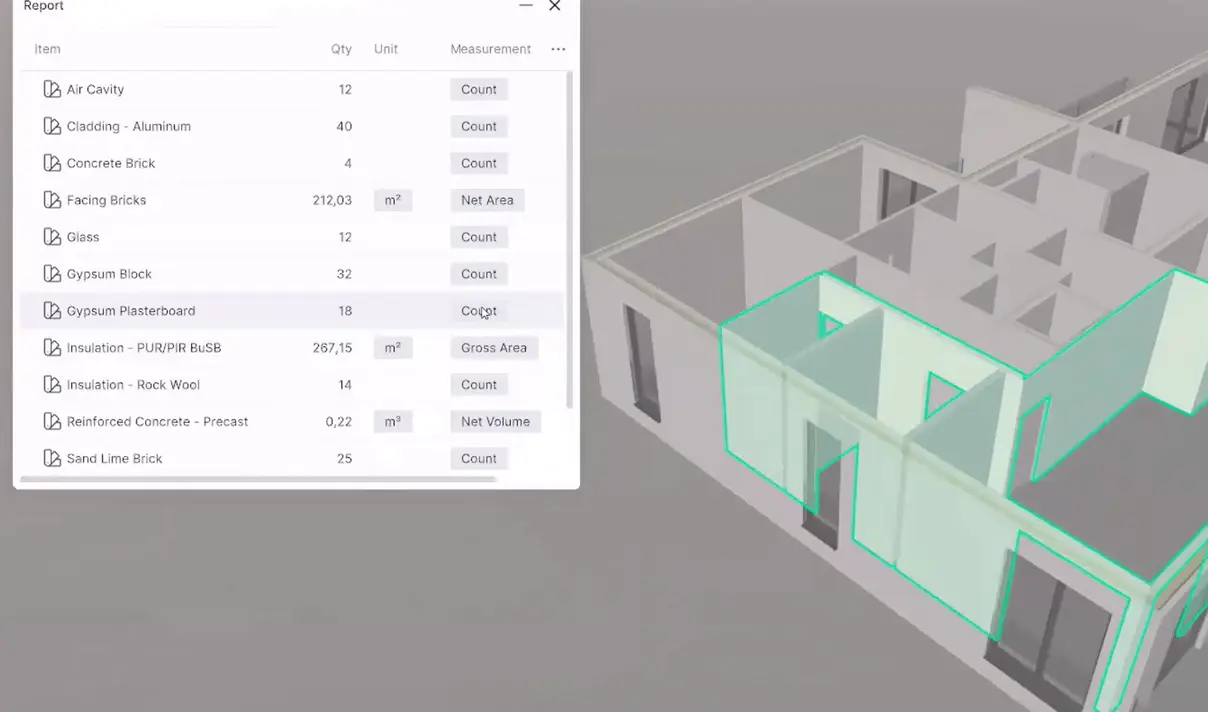
Smart reporting: generate flexible schedules and quantity reports based on geometry and data, exportable to CSV.
Modelling that understands your building
Qonic includes a full modelling kernel, not just a viewer. You can push, pull, boolean, loft and assemble geometry directly in the browser. But what sets it apart is how it understands the relationships between building elements.
Import an IFC from any authoring tool, and Qonic can read the semantic data (wall types, door classifications, spatial relationships) and use it to maintain intelligent connections when you edit. Move a wall, and hosted doors move with it. Adjust a panel, and associated geometry updates automatically.
From model to drawing without the detour
Once your model is coordinated and your data is clean, Qonic now takes you all the way to documentation. You can generate floor plans and sections directly from views set up in your model. Dimensions, annotations, and room tags are added automatically. Open the drawing inside Qonic, review and edit where needed, and export as DWG or PDF when it's ready.
When the model changes, you regenerate. The documentation follows the model always current, never out of sync.
Coordination without the friction
One of the most powerful features shown in the webinar is Qonic's approach to collaborative modelling. Rather than locking a model while someone works on it, Qonic uses a Git-inspired branching system:
- Each team member works on their own personal branch.
- Changes are isolated until you're ready to share them.
- When you publish, others are notified and can review your changes.
- Conflicts between overlapping edits are surfaced and can be resolved.
- Clash detection is built into the same environment: run interference checks across your federated model, assign issues to team members, and track resolution all without leaving Qonic.
This makes it possible for multiple people, architects, structural engineers, contractors, to work on the same model simultaneously, without stepping on each other's work.
4D Planning, directly from your IFC
Qonic also supports 4D construction sequencing. You can either build a schedule from scratch by selecting elements and assigning tasks, or use the smart preset system: define the order of element types (slab → walls → columns → beams) and Qonic auto-generates a first draft of your construction programme, floor by floor. The result can be exported to planning tools like Primavera or MS Project for further refinement.
An Open Platform for Integration
For teams who want to go further, Qonic offers a REST API that lets you read and write model data programmatically, from any language or tool, including Excel and Power BI. Object properties, classifications, materials, spaces and type definitions are all accessible via API endpoints, with open-source sample projects available to get you started.
An SDK with event-driven integration is also in development, allowing software developers to build direct two-way connections with Qonic.
Qonic Intelligence: AI-assisted classification
One of the most time-consuming parts of working with IFC data is getting the classification right. Qonic Intelligence automates that step: it classifies building elements with over 98% accuracy across walls, slabs, beams, columns, openings, and more.
The result: models that are clean, consistent, and ready for coordination, reporting, or handover, without hours of manual cleanup. Qonic Intelligence won the buildingSMART openBIM Award 2025, recognised for its contribution to open, data-driven BIM workflows.
Coming Soon: Real-world geographic context
One of the most anticipated upcoming features is the integration of Bentley Systems' Cesium tiles directly inside Qonic. This will allow you to edit your BIM model while the full geographic environment: surrounding buildings, terrain, and infrastructure is rendered around it in real time, with no performance penalty. As one viewer put it: "The best thing I've seen so far in BIM modelling."
Missed the live session?
If you couldn't make it to the webinar or want to revisit the demonstrations, you can request the full replay link here.
Try it free
The future of BIM is accessible, collaborative, and contextual. And it's here.
Start free at app.qonic.com, no installation, no seat limits.
Your Questions, Answered
During the webinar, the audience asked sharp, practical questions. We listed the most important ones:
If I enrich an IFC in Qonic and the architect sends a new version, do I lose all my work?
No. Qonic uses a Git-inspired branching system, the same logic that software developers use for code. When a new IFC version comes in, it is merged, not overwritten. Your enrichment layer stays intact. Where conflicts exist between your changes and the incoming model, Qonic surfaces them so you can review and resolve them element by element. Your work doesn’t disappear but it evolves.
The structural engineer just pushed changes. I'm not ready to deal with them yet. Can I ignore it and keep working?
Yes. In Qonic, you control when you accept changes from others. Everyone works on their own personal branch. When someone publishes, you see a notification and a visual diff of exactly what changed but you decide when to merge those changes into your own work.
Can I save filter settings and reuse them across models or sessions?
Yes. Filter selections can be saved and shared within your team. This means you can define a view, specific element types, property filters, colour coding, and reapply it on any model. You can also share saved filters with colleagues so everyone is working from the same visual setup.
Does Qonic support ISO 19650 workflows: WIP, Shared, Published phases with approval routing?
Role-based permissions are already available today, giving you control over who can view, edit or approve changes in a model. Full ISO 19650 phase support as WIP, Shared, Published, with milestone-based transitions and formal approval workflows is on the roadmap and actively in development. The version control foundation is already in place; the structured phase logic is being built on top of it.
Can the model track element status across the full lifecycle such as ordered, fabricated, delivered, and installed?
Not out of the box today, but it is exactly the direction Qonic is heading. The data model is already flexible enough to carry custom properties at any level. The Qonic vision is that validation and lifecycle status become a continuous, embedded workflow rather than a post-project checklist. This is something we are actively thinking about and building toward.
Can I model MEP objects in Qonic, like ducts, pipes, and fittings?
Qonic currently has a generic modelling kernel that supports extrusions, booleans and push/pull operations, enough to create basic MEP geometry. Sweeping tools, which let you sweep a profile along a path to model pipes and ducts, are in development and will be available soon. For fittings and terminals, the standardised components that come from a library rather than being drawn from scratch, the component panel already gives you a first look at how this will work. The direction is clear: start with the architectural and structural workflows that are fully available today, and progressively open the platform toward MEP and other disciplines.
Can Qonic run MEP calculations, like checking if a duct connection is missing or calculating airflow?
Qonic does not perform engineering calculations natively, and that is intentional. Domain-specific calculations belong in domain-specific tools. What Qonic provides is an open API that gives those tools full access to your MEP model data: systems, connections, component types, and properties. The calculation happens in your specialist tool of choice; the enriched results come back into Qonic. Qonic as the hub, specialist tools at the edges.
Where is Qonic data hosted?
All data is hosted in Europe, specifically on Amazon Web Services infrastructure in Ireland. Qonic is a Belgian company (Gent) and operates fully within European data jurisdiction.
Is Qonic a replacement for Revit or Solibri?
We’re not just looking to replace an icon on your desktop; we’re here to fix a broken process.
Qonic sits at the heart of your workflow, consolidating everything that used to be scattered across Revit, Solibri, and spreadsheets. Think of it as your primary engine for high-level coordination and modeling. While you can still leverage legacy tools for niche tasks or specific local requirements, Qonic is where the model truly becomes 'constructible.'
We aren’t just adding another tool to your stack; we’re providing the environment that traditional software simply can’t handle: real-time collaboration at a massive scale, without the file-syncing headaches of the past. It’s a shift in mindset: using Qonic as your central platform, while letting other tools serve as specialized inputs only when you need them.
Can Qonic generate 2D drawings from a BIM model? Yes. Qonic generates floor plans and sections directly from views set up in your model. Dimensions, annotations, and room tags are added automatically. You review and edit the drawing inside Qonic, then export as DWG or PDF. When the model changes, you regenerate — the documentation stays in sync with the model.
Does Qonic have clash detection? Yes. Clash detection runs directly inside Qonic across your federated model. You can run interference checks, assign issues to team members, and track resolution — all within the same environment where you model and coordinate. No separate clash tool required.
What is Qonic Intelligence? Qonic Intelligence is Qonic's AI-assisted classification engine. It uses a self-learning neural graph to automatically classify building elements in IFC models, achieving over 98% accuracy. It reduces the manual effort of data cleanup and ensures models are correctly structured for coordination, reporting, and handover. Qonic Intelligence won the buildingSMART openBIM Award 2025, recognised for its contribution to open, data-driven BIM workflows.
Where is Qonic hosted, and is my data secure? All data is hosted in Europe on Amazon Web Services infrastructure in Ireland. Qonic is a Belgian company based in Ghent and operates fully within European data jurisdiction.
Questions or feedback?
We’d love to hear your perspective.
Email us at info@qonic.com, connect on LinkedIn, or join the Qonic community to continue the conversation.